
Level Up Your LinkedIn Profile: 3 Strategic Upgrades That Make a Big Difference


LinkedIn is not just a digital résumé. It’s a search engine. It’s a credibility snapshot. It’s often your first impression before a recruiter ever reads your experience.
And most profiles? They blend in.
They’re either incomplete, overly generic, or stuffed with keywords that don’t actually say anything about how the person works.
The good news is that you don’t need to overhaul everything to make a meaningful difference. If you focus on three strategic upgrades, you can dramatically improve how your profile performs and how you’re perceived.
Let’s start with the one most people underestimate.
1. Your LinkedIn Profile Photo
Before someone reads your headline, before they scan your experience, they see your photo. That image shapes subconscious trust almost instantly.
And yet I still see:
Cropped wedding photos
Blurry selfies
Vacation shots
Outdated headshots from 10+ years ago
Or no photo at all
This isn’t about vanity. People are visual creatures and first impressions matter!
A strong LinkedIn photo should:
Be high resolution
Show clear eye contact
Have a neutral or softly branded background
Reflect how you’d show up in a professional setting
Feel current
It’s important that your profile picture conveys that you are friendly, approachable, and professional. But you can also inject some of your personality into this picture, so it stands out among the sea of standard headshots.
You don’t need to invest in a professional photographer to achieve the right look. With a phone and a friend, you can get a high-quality picture. Here are a few details to keep in mind:
Opt for natural lighting. Filtered sunlight is the best for a balanced and bright image, and it won’t make you squint or cast harsh shadows.
Take a variety of images and make sure you have adequate space around you, that way you have options and can crop to your desired size. Remember, too close up is not flattering.
Pick a complimentary background that isn’t too busy or personal. Outdoor shots in front of trees or textured walls work well, or if you’re inside pick a wall with a solid colour. Unless you’re a bedding specialist or plumber, avoid shots in your bedroom or bathroom.
Have fun with it! Capture some shots of you laughing, engaging in your favourite activities, and letting your true self come through.
Once you’ve selected some good pictures to work with, you can up the ante by editing them. There are lots of free tools online, such as Canva, PFP Maker, or Bazaart, that will allow you to adjust the colours, brightness, and saturation. If you’re feeling extra savvy, you can change your background or blazer to match your brand colour. Check out these examples:
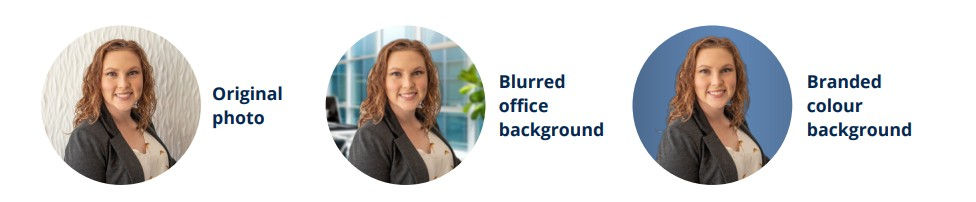
You can have the strongest résumé in the world, but if your profile photo erodes trust, many people won’t read any further.
And while we’re here, your banner image matters too. It’s subtle, but it reinforces positioning. A blank default banner is a missed opportunity.
2. Your Headline
Your headline appears everywhere:
In search results
In comments
In connection requests
In messages
It’s not just your job title. It’s your positioning statement.
One of the most common mistakes I see is this:
“Results-Driven Professional | Strategic Thinker | Team Player”
That tells me nothing.
Instead, your headline should combine:
What you do
Who or what you serve
The kind of impact you create
Here are a few examples:
🎯 Operations Leader | Lean Process Optimization | Driving Quality, Safety & Efficiency Across Multi-Site Manufacturing
🎯 Level 80 DBA Wizard / SQL Server Database Administrator 🧙 I structure secure, high availability relational databases so you get the most out of your data
🎯 Finance Recruiter who speaks your language! Leveraging a 15-year career as a finance professional to personalize your candidate experience
Think of your headline as the bridge between your photo and your story. It should make someone curious enough to click into your profile. This is also where keyword strategy belongs, but naturally. Not in a way that reads like a list. Search optimization matters. But clarity matters more.
3. Your About Section
Your About section is 2,600 characters of strategic real estate. And most people either ignore it or treat it like a miniature résumé.
This is where personality and positioning intersect.
It should answer:
What do you do?
How do you do it?
Why does it matter?
And it should sound like you.
I’ve broken down my full framework for writing a compelling About section in this video:
At a high level, a strong About section includes:
A hook that invites someone in
A clear articulation of your role and focus
A few proof points or mini wins
Insight into how you approach your work
Keywords woven in naturally
A simple call to action
What it should not be:
Third-person corporate biography language
Keyword stuffing
A copy-paste of your résumé summary
LinkedIn is a platform built for conversation. Writing in first person makes you feel more real, more accessible, and more confident.
In a market saturated with AI-generated content, specificity and perspective are differentiators. Your About section is where people get a sense of what it would actually be like to work with you.
Want Help Writing Your About Section?
If you’re staring at a blank screen wondering how to actually structure this, I’ve created a free fill-in-the-blank worksheet to guide you through it.
It’s the same structured framework I use with clients, but simplified so you can apply it yourself.
Download the free LinkedIn About Section Worksheet here 👇
Bonus: Your Experience Section
Once your photo, headline, and About section are strong, your Experience section becomes the proof. This is where many profiles fall apart.
If you’ve simply copied and pasted job descriptions, you’re missing an opportunity.
Instead:
Lead with outcomes
Add context (team size, budget, scope, scale)
Highlight progression
Show how you think, not just what you did
For example, instead of:
“Responsible for managing cross-functional projects.”
Try:
“Drove cross-functional initiatives across three departments, reducing cycle times by 28% and aligning stakeholders around a standardized delivery framework.”
The goal is not to impress with complexity. It’s to demonstrate clarity and impact.
Bringing It All Together
Think of your LinkedIn profile as layered positioning:
Your photo builds trust.
Your headline creates clarity.
Your About section tells your story.
Your Experience section proves your value.
When those elements align, your profile stops feeling generic and starts feeling intentional.
LinkedIn is not about sounding impressive. It’s about making it easy for the right people to understand what you bring to the table.


Comments